

Are you wasting hours every day sifting through hundreds of leads to find the ones that are actually worth pursuing? Business owners know better than anybody that time is money, and manually qualifying leads can easily become one of your biggest time-sinks.
This was the case with me when I was building JustReachOut back in 2015, we had a small team and I did not have a big budget for fancy software or a lot of SDRs.
What I found was that there is a way to automate lead qualification, freeing up my team’s time to focus on setting up demos, closing deals, and growing our company.
In this guide, I am going to lay out three different ways business owners can leverage technology to automate their lead qualification process, improve conversions, and boost revenue.
I’ll go over all you need to know to streamline your lead qualification process and drive sales. If you're ready to take your lead qualification to the next level (and save time), keep reading.
Step 1: Demo Page with Qualification Criteria & CRM Integration
In the early days after starting JustReachOut, we had no automated lead qualification system. Every single lead was qualified manually, which, as you can imagine, became a major time-sink. Here is what happened:
- They emailed us and asked about using our platform
- We would record their info in a Google sheet and respond to them with some qualification questions such as “Have you ever gotten press before?”
- Only 50% of them would respond to our questions
- Of those who responded very few actually put the time into answering all the questions
- We would lose close to 80% of all the leads who contacted us in this back and forth emailing
To solve this, we created a landing page that allowed leads to schedule their own demos. Creating a good demo page is the first step in automating your lead conversion pipeline.
Your company’s demo page should include criteria to pre-qualify leads before they even reach your sales team. This is essentially a questionnaire that the prospective customers fill out themselves.
First step in creating a demo page is to identify the criteria that make a lead a good fit for your business. This can include factors like
- company size
- Industry
- Budget
- specific problems your product or service can address
Create the demo page to showcase your product or service, including a short form for leads to fill out. This should include the questions that will determine whether the lead will be moved into the next stage of the conversion pipeline.
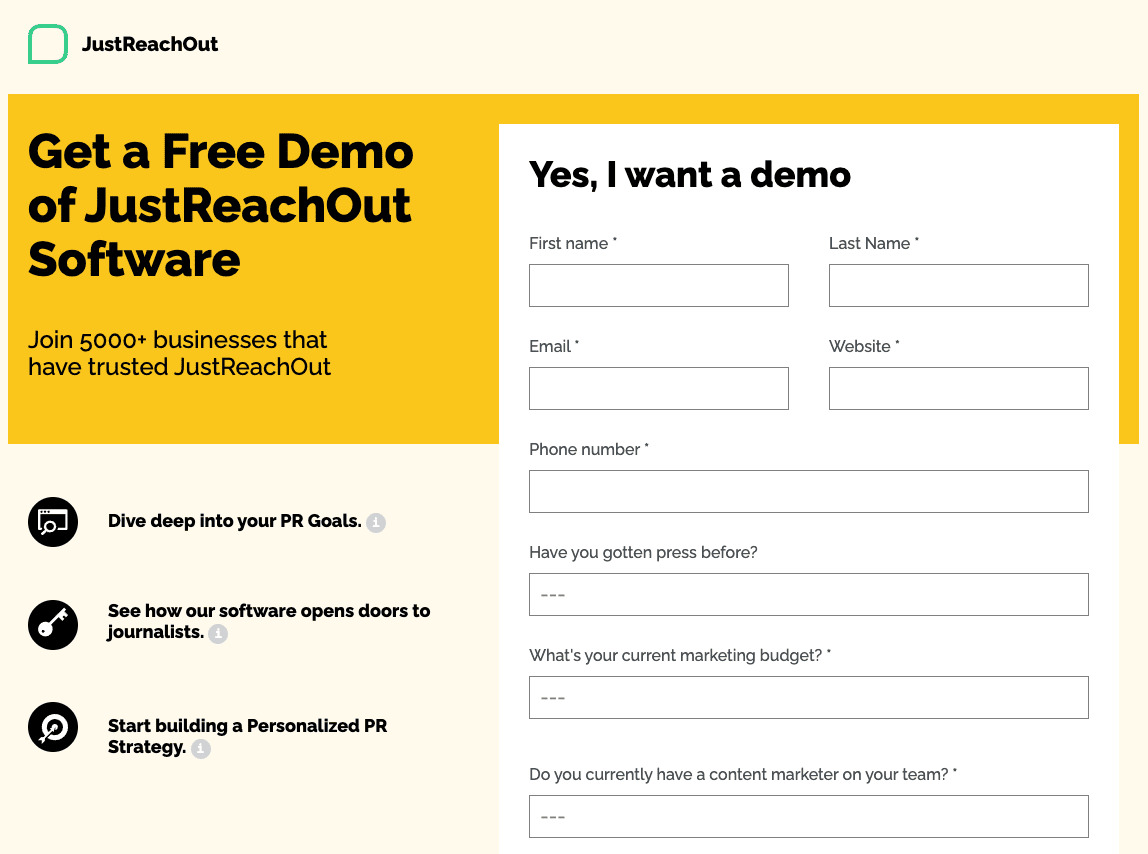
To cite a specific example from our case, our qualification form asks if the lead has gotten press before, as this is a strong indicator that they’ll be able to get press again.
Here’s the JustReachOut demo page to give you an idea of what this looks like:
Next, you should integrate your demo page with customer relations management (CRM) software to further filter quality leads.
Notice that we collect their phone number, we are well aware that many people use a virtual phone number through a voip phone service which is OK because we are going to use this number to follow up with them later on via SMS texts to get them to show up to a demo call.
When prospects fill out the form on the demo page, their information will be automatically sent to your CRM.
From there, the CRM can score each lead based on their answers to your qualification questions. Leads that meet your criteria will then be flagged as high-quality leads and passed along to your sales team for follow-up, while others can be added to your nurturing campaigns to keep them engaged until they are ready to buy.
In our case our CRM which is checked by customer service is the actual phone system software such as Nextiva or another alternative, we use Zapier to take all the information from this demo page and populate it into Nextiva.
We also use Zapier to automatically send customer information from Nextiva to the HubSpot - the CRM which our sales team uses. The Zap then creates a deal for the prospective customer, filling it in with their answers from the demo page questionnaire. Here’s what that looks like in our CRM:
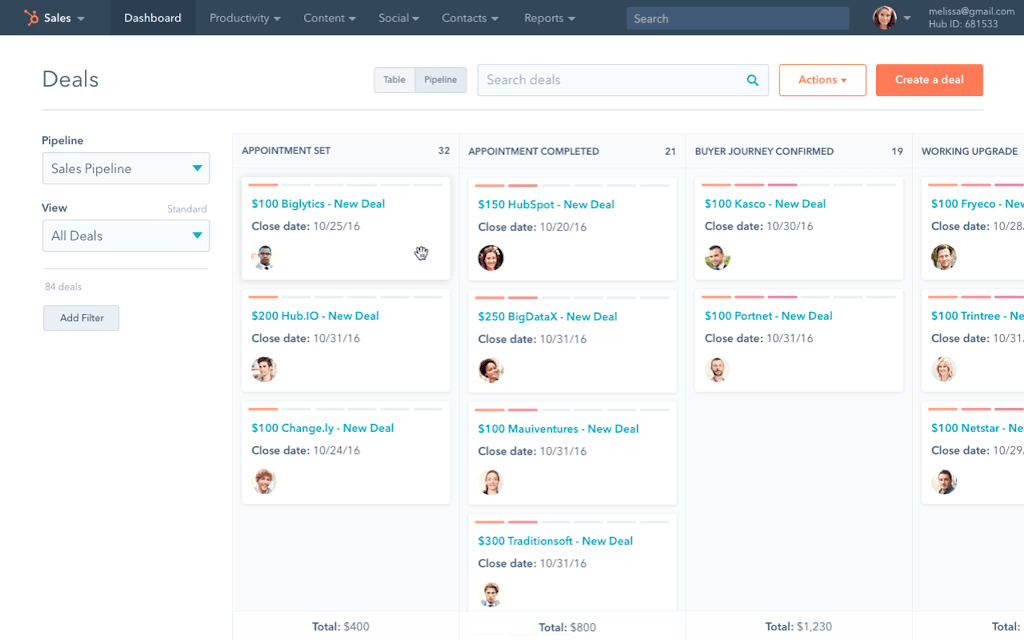
This allows our sales rep to sort the leads according to their chances of becoming paying customers, filtering out the deals for the least-qualified leads (i.e. the ones least likely to convert into a sale).
Depending on the nature of your service or product, this could come down to a single question that determines whether a lead is worth pursuing or not.
Integrating your demo page with your CRM in this way allows you to automate the lead qualification process and direct your sales team's time and energy on the most promising leads.
Step 2: Follow up with Qualified Leads w/ ConvertKit Automation
Now that you've pre-qualified your leads using a demo page with qualification criteria and integrated that with your CRM, it's time to move on to step two of the lead conversion automation process: automating lead follow-up. This is where ConvertKit comes in.
Like manually qualifying leads, manually sending out emails to prospective customers can be a major time-waster. We used to have our sales reps send out emails to each lead, asking them some more qualification questions and setting up a time for a demo. The demo page and CRM automation described in step one takes care of that now, and ConvertKit automates the email follow-ups.
ConvertKit streamlines this process by allowing you to create targeted email sequences that automatically follow up with your leads based on their behavior and interests, ensuring that you stay top-of-mind and keep them moving through the sales funnel. Here’s what the process looks like:
- The lead fills out the qualification form on the demo page. This information is entered into WordPress.
- The demo page info is added to HubSpot via Zapier, and a contact and deal are created for the lead.
- We invoke the HubSpot CRM API to create a new property for each contact. This property is named “Start email” and assigns a value of 0 to the contact. Here’s what that looks like:
{ "properties": {
"email": "[email protected]",
"firstname": "Dmitry",
"lastname": "Dragilev",
"phone": "(555) 555-5555",
"company": "TopicRanker",
"website": "topicranker.com",
"Start email": "0" }
"Question1": "Yes"
"Question2": "No"}
- Our sales rep filters out any deals which do not meet qualification criteria based on answers from the form they filled out on our demo page.
- The sales rep then manually changes the value for “Start email” to “1”.
- We use the HubSpot API to retrieve all contacts and check the “Start email” field using Hubspot Contacts API with this method.
- If the “Start email” field has a value of “1,” we use ConvertKit API to add the contact to our ConvertKit account using this method: https://developers.convertkit.com/#update-subscriber
- We use an “Add subscriber to an automation flow” call to add them to a specific email automation sequence - this is the method we use: https://developers.convertkit.com/#add-subscriber-to-a-sequence
Lastly, we have a sequence in ConvertKit designed to get the lead to book a time for ad emo themselves. We send out a personalized email with a link to our calendar app (we use Calendly) to schedule a demo at an available time of their choosing.
This makes the booking process as smooth as possible for both your and your most promising leads, increasing the chances of a successful demo – and, ultimately, a successful sale.
Step #3 Use SMS Automation To Ensure They Show Up To a Demo
While the above automated email follow-up system is a powerful tool for converting leads, it's important to remember that not all of your prospects are constantly checking their inbox. There’s also the chance that your emails could end up in their junk folder by mistake. That's where automated SMS comes in handy.
By integrating your CRM with an SMS automation tool, you can send personalized, targeted text messages to your qualified leads to remind them of the demo they scheduled through your calendar app. These messages can be customized to include specific details about the demo, as well as any other relevant information that may help the lead feel more comfortable attending.
Before a scheduled demo, we use automated SMS to send the lead a text message politely reminding them of the coming appointment. The text is sent half an hour before the appointment to the phone number they entered on the demo page. We keep it friendly and brief, addressing them by their first name and asking them if they’re still on for the demo in 30 minutes. We automate this through Zapier and any phone system alternatives which has SMS functionality.
Automated SMS follow-up is a powerful way to ensure that your qualified leads attend their scheduled demos. At JustReachOut, we find that this increased the chance of the lead showing up to the demo from 50% to 90%. It follows that this greatly increases the chances of a successful conversion. You can also use this to make it easy for the lead to reschedule, if necessary, rather than having them no-show and then ghost you.
To make the most of automated SMS follow-up, it's important to use a tool that allows you to personalize and target your messages based on the lead's behavior and interests. Zapier, the tool we use, is a popular option that integrates well with many CRMs, including HubSpot. This allows you to automate your SMS follow-up while still providing a personalized touch.
Conclusion
Automating your lead qualification process is crucial for any businesses looking to save time, streamline their sales funnel, and improve conversions. By implementing a demo page, automating the qualification and follow-up process, and implementing all of it with a good CRM system, you can save precious man-hours and ensure that your sales team is directing its energy and attention towards the most promising leads.
Ultimately, the above automation steps can help you close more deals, grow your customer base, and increase your conversion rate. It takes a little effort and forethought to implement, but the time savings and the increased chance of a successful sale is worth it. Don't hesitate to explore these methods and fine-tune the lead conversion setup that works best for you. With modern tools and the right strategy, you'll be well on your way to a more efficient and effective sales pipeline.
For More-
Phone: +1-800-799-0600
Address: 9451 East Via de Ventura
Scottsdale, AZ 85256, USA
Source: Story.KISSPR.com
Release ID: 590551